
AI Live Chat
A Website That Answers Questions at 2 AM
Your AI live chat answers visitors’ questions from your own website, day or night, and links them to the right page. When it can’t answer, it says so and offers to take their details for you. You see every question people ask, so your website keeps getting better. It’s included on every plan.
See Every Question Your Visitors Ask
This is the chat dashboard on the HealthCARE Express website, an urgent care network with 16 locations. Since mid-August, its chat has had 286 conversations. Visitors ask about insurance, self-pay prices, virtual visits and how to check in.
Click View to read the whole conversation. Use the dots under the screenshot to see one: a visitor typed just “Telehealth,” and the chat explained that HealthCARE Express offers virtual visits, linked the Virtual Visits page and an article on which conditions qualify, then offered to help book.
Every question shows you what customers want to know before they call. When the same question keeps coming up and the website doesn’t answer it, we add the answer to your website, so the next visitor finds it.
Screenshots of the HealthCARE Express chat dashboard, October 27, 2026. Conversations are anonymous unless a visitor chooses to leave their details.


When Your Website Doesn’t Say, the Chat Says So
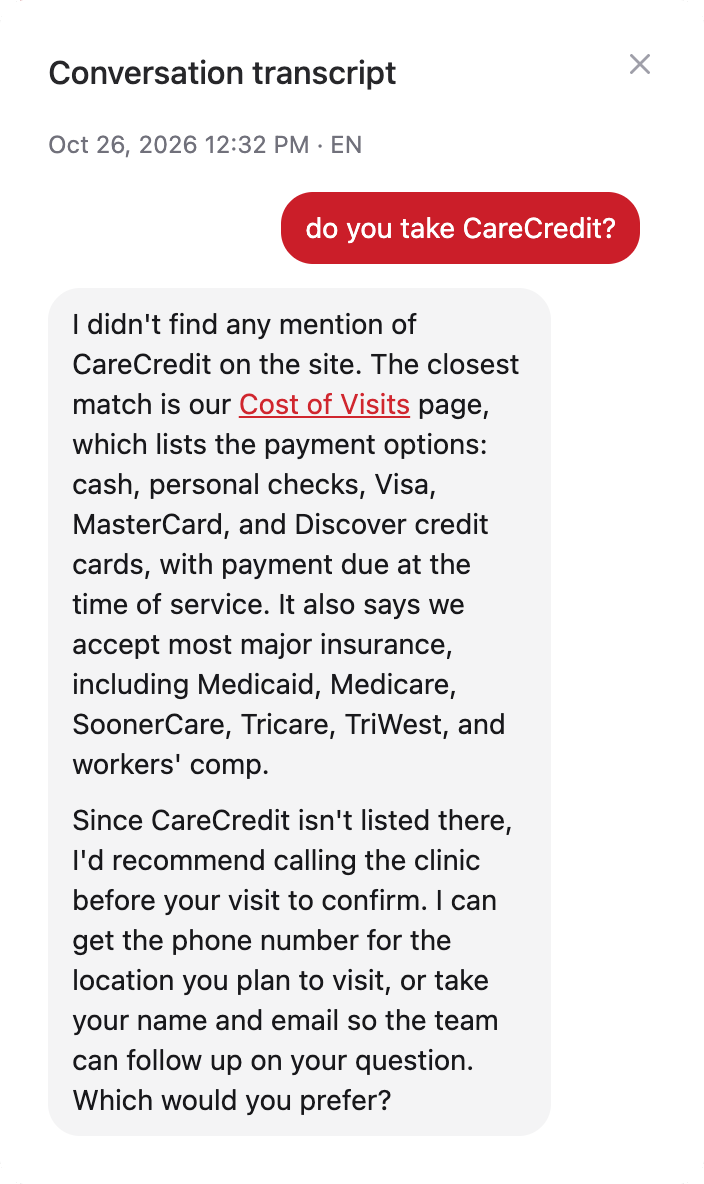
A visitor asked HealthCARE Express, “Do you take CareCredit?” Their website doesn’t mention CareCredit. Instead of guessing, the chat said it couldn’t find it, linked the Cost of Visits page with the payment options the site does list, and offered the clinic’s phone number or to take the visitor’s name and email for the team.
Questions like this go on an Unanswered Questions list. That list is a to-do list for your website: add the answer to a page, or give the chat a note, and the next visitor gets a real answer.
A real conversation from the HealthCARE Express website, October 26, 2026.
What Your AI Chat Does
A chat button on every page that knows your business, works around the clock and hands you the leads.
Answers From Your Own Website
It searches your pages, services, articles and locations, reads the page that answers the question, and replies with a link to it. It doesn’t make up prices, policies or hours.
Day or Night
It answers at 2 AM, on weekends and on holidays, when nobody is there to pick up the phone.
Takes Their Details
When your website doesn’t have the answer, it offers to take the visitor’s name and email. They’re added to your contacts and you get an email, ready to reply.
Speaks Their Language
It replies in the language the visitor writes in, including Spanish, so you can help customers who are more comfortable in another language.
You Can Jump In
Watch conversations as they happen and take over from your dashboard when a visitor needs a person. Hand it back to the chat when you’re done.
Follows Your Notes
Tell it things your website doesn’t say, like “each clinic has its own booking link,” and it uses them in every answer. HealthCARE Express does exactly that.
How it works
How Your AI Live Chat Works
Nothing to set up on your end. It comes with your website and keeps itself up to date.
It learns your website
Your chat goes live with your site and already knows every page. New and changed pages are picked up on their own.
Visitors ask, it answers
A chat button sits on every page. It answers from your website and links to the page with the details, or takes the visitor’s details for you.
We fill the gaps
We look at what visitors are asking. When your website is missing an answer, we add it to a page or give the chat a note, using your monthly update tasks.
Your chat uses the same search as your smart site search.
Questions About AI Live Chat
Still have a question?
Contact us